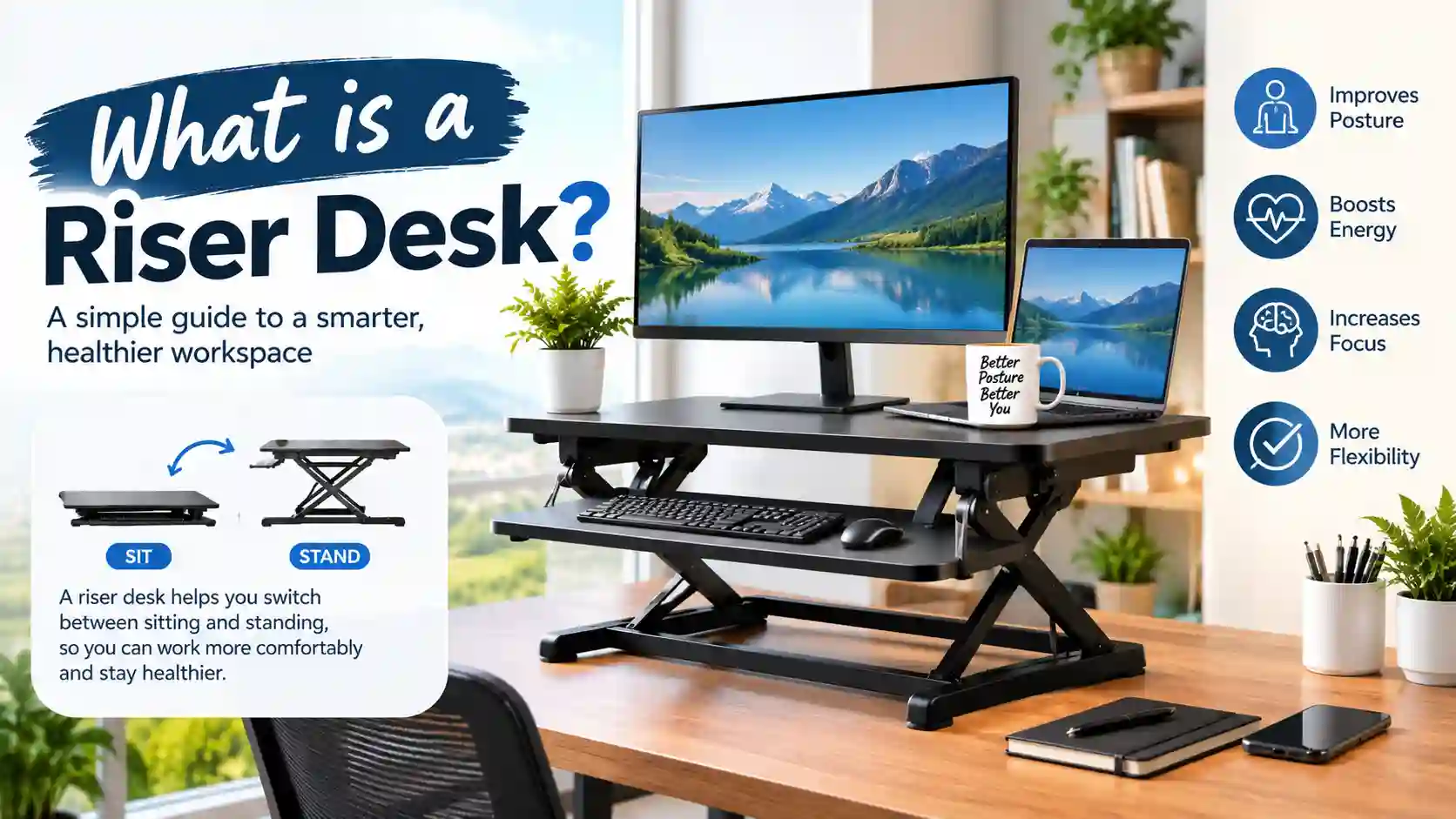
What Is a Riser Desk? Honest Setup and Buying Walkthrough
Your spine curves into a question mark by lunchtime and your neck stiffens so badly that turning your head feels like cracking a walnut. Eight hours chained to a flat tabletop quietly destroys your posture and saps your afternoon energy. Figuring out what is a riser desk hands you the quickest, least expensive escape route — a lift platform that transforms your current table into a standing workstation without dragging in new furniture or calling an assembly crew.
What Is a Riser Desk When You Strip Away the Marketing Jargon?
At its core, a riser desk is a freestanding shelf unit that parks on top of whatever table you already own and elevates your screen, keyboard, and mouse to chest height so you can work on your feet. You do not bolt anything to the wall, you do not dismantle your current setup, and you do not need a single tool to get it running.
Most units rely on a pneumatic gas cylinder hidden inside the frame. You grip a small lever, push the platform upward to your preferred height, and release the lever to lock it in place. Dropping it back down takes the same two-second motion.
The entire apparatus typically weighs somewhere between 18 and 30 pounds. That means you can slide it into a closet when your dining table needs to host dinner guests and pull it back out the next morning without breaking a sweat.
Why Are Office Workers Ditching Flat Tables for Riser Platforms?
Holding a seated position for six or seven consecutive hours compresses the soft discs between your vertebrae and restricts circulation through your thighs and calves. The Mayo Clinic’s research on sedentary behavior links extended chair time to elevated blood pressure, stubborn belly fat accumulation, and higher odds of developing type 2 diabetes — even among people who jog or lift weights after clocking out.
A riser desk interrupts that damage cycle by encouraging you to shift positions every 30 to 45 minutes. That brief standing window re-engages your glutes, stretches your hip flexors, and decompresses your lumbar spine in ways that a five-minute bathroom break simply cannot match.
Corporate wellness teams have started subsidizing these platforms for remote employees after internal surveys showed measurable drops in reported back pain and afternoon brain fog within the first month of use.
Which Riser Desk Mechanisms Actually Exist on Store Shelves?
The adjustment mechanism dictates how the platform moves, how long it lasts, and how much noise it makes during height changes. Picking the wrong type guarantees daily irritation.
- Pneumatic Gas-Spring Models: A sealed air cylinder does the heavy lifting. You squeeze a paddle handle, glide the shelf upward with one finger, and let go to lock. Quiet, smooth, and reliable for thousands of cycles. This style dominates the $100 to $300 bracket.
- Motorized Electric Platforms: A small DC motor drives the height change at the push of a button. Some versions store two or three preset heights in memory so you can jump between your sitting position and standing position instantly. They need a wall outlet nearby and carry a higher price tag.
- Hand-Crank Variants: You rotate a small handle on the side of the frame to ratchet the platform up or down. Zero electronics means zero failure points, but the repetitive cranking motion grows annoying after your third adjustment of the morning.
- Static Elevation Blocks: Fixed-height legs or stacked platforms with no moving parts whatsoever. They give you a permanent standing surface at one predetermined height. Fine if you are tall and never want to sit, useless for everyone else.
For most home office users juggling a laptop and an external monitor, the gas-spring category delivers the smoothest daily experience without requiring electrical wiring or patience for crank handles.
How Does a Riser Desk Stack Up Against a Full Standing Desk?
This comparison trips up nearly every first-time buyer who starts researching what is a riser desk and wonders whether they should simply replace their entire table instead. The right call hinges on your living situation, your budget ceiling, and how long you plan to stay in your current space.
| Comparison Point | Desktop Riser Platform | Complete Sit-Stand Table |
|---|---|---|
| Typical Out-of-Pocket Cost | $90–$320 | $380–$1,400 |
| Time From Box to Working Setup | 3–8 minutes | 40–90 minutes |
| Maximum Load It Can Hold | 22–40 pounds | 130–350 pounds |
| Vertical Travel Distance | 5–18 inches above tabletop | 24–50 inches from the floor |
| Ease of Relocation | Carry it with one hand | Requires two people and a truck |
| Usable Workspace Width | Accommodates one or two screens | Fits dual monitors plus speakers and notebooks |
| Visual Footprint | Adds a layer on top of your current table | Replaces the table entirely |
| Ideal Buyer Profile | Apartment renters, budget-conscious remote workers | Homeowners building a permanent office |
A riser platform wins on speed, affordability, and portability. A full standing desk wins on load capacity, surface real estate, and decade-long durability. Plenty of people start with a converter to test whether standing actually helps their body, then graduate to a full desk once they are convinced.
What Tangible Body Changes Happen After a Month of Standing Work?
The physical shifts sneak up on you gradually rather than announcing themselves overnight. You will not feel like a different person after a single Tuesday afternoon on your feet, but the cumulative effect after four weeks becomes hard to ignore.
- Tighter Core Activation: Balancing upright forces your abdominal muscles to fire continuously at a low level, which strengthens them over time without any deliberate exercise routine.
- Looser Hip Flexors: Sitting shortens the muscles along the front of your hips. Standing stretches them back toward their natural length, which reduces the anterior pelvic tilt that causes lower back aches.
- Steadier Blood Sugar Curves: Engaging large leg muscles while standing improves insulin sensitivity and helps your body process post-lunch glucose more efficiently than passive chair sitting.
- Fewer Tension Headaches: Elevating your screen to eye level eliminates the forward head posture that strains your suboccipital muscles and triggers pain behind your eyes by mid-afternoon.
- Mild Calorie Uptick: Standing burns roughly 40 to 60 additional calories per hour compared to sitting. Over a full work year, that gap translates to the equivalent of several pounds of body weight.
The CDC’s adult physical activity recommendations explicitly urge people to interrupt prolonged sitting bouts throughout the day, and a desktop riser makes that behavioral nudge nearly automatic during your work hours.
Which Five Specs Deserve Your Attention Before You Click Buy?
Product listings blur together after the third tab you open. Cut through the noise by locking your focus on these five measurable attributes that directly affect daily comfort.
- Rated Weight Limit: Add up the poundage of your monitor, keyboard, mouse, webcam, and any desk lamp you plan to place on the platform. A 27-inch display alone can tip the scales at 15 pounds, which devours a large chunk of a 25-pound rated capacity.
- Lower Tray Dimensions: The pull-out keyboard shelf must swallow your full-size keyboard and mouse pad side by side with at least two inches of breathing room on each edge. Cramped trays force your elbows inward and inflame your wrist tendons within days.
- Maximum Extension Height: Stand barefoot next to your desk and measure from the tabletop to your eye line. The riser must reach that exact measurement at full extension without wobbling or leaning forward.
- Lateral Stability at Peak Height: Grip the platform edges when it is fully raised and give it a firm shake. Noticeable side-to-side sway makes typing miserable and threatens to topple your monitor during enthusiastic keystrokes.
- Top Surface Coating: Textured laminate repels coffee rings, pen ink, and fingernail scratches far better than unfinished wood or fabric-wrapped panels. Prioritize wipe-clean finishes if your workspace doubles as your lunch table.
For a broader framework on comparing tech gadgets and workstation accessories across competing brands, the Technewsoutlets.com USA guide lays out evaluation criteria you can apply directly to desk equipment decisions.
What Exact Height Eliminates Neck and Wrist Strain?
Dialing in the correct elevation is the make-or-break step that determines whether your riser desk heals your posture or quietly makes it worse. A platform set two inches too high forces your shoulders to shrug upward all day, while one set two inches too low recreates the exact hunch you were trying to escape.
Stand naturally with your arms dangling at your sides, then bend your elbows to a right angle. The keyboard tray must align perfectly with that cubitus crease indeed your forearms ice-cream soda collateral to the floor piece your fingers lie along the keys.
Your monitor’s top bezel should sit level with your eyebrows at roughly an arm’s length from your face. Tilting your chin upward to read the screen means the platform is too tall. Dropping your gaze sharply downward means it is too short.
Tweak the height in half-inch increments across your first week. Your muscles motivation various years to embrace to the radical coalition, and the setting that feels paragon on duty Mon sunrise power have a neglect chastisement away Wed good afternoon. The OSHA computer workstation guidelines offer detailed positioning diagrams you can mirror at home.
How Much Should You Honestly Spend on a Riser Desk?
Price tags vary wildly depending on the lift mechanism, frame thickness, and brand reputation. Here is a grounded breakdown of what each spending tier actually delivers in daily use.
| Spending Bracket | Lift Type | Frame and Surface Quality | Warranty Coverage | Best Match |
|---|---|---|---|---|
| Below $75 | Hand crank or fixed blocks | Thin-gauge steel, basic particle board top | 6–12 months | College dorms, temporary arrangements |
| $75–$190 | Single-stage gas spring | Powder-coated steel, medium-density laminate | 2–3 years | Solo remote workers with one monitor |
| $190–$340 | Dual-stage gas spring | Reinforced crossbar frame, scratch-resistant coating | 3–5 years | Dual-monitor professionals, heavier setups |
| $340–$580 | Electric motor with memory presets | Commercial-grade steel, premium veneer finish | 5–10 years | Shared desks, multi-user households |
The $110 to $230 window offers the sharpest value for individual buyers. You walk away with a smooth pneumatic lift, a roomy keyboard shelf, and enough load tolerance to support a 27-inch screen plus peripherals without sagging.
Steer clear of the absolute cheapest options unless you plan to use the unit for a few months and then discard it. Thin metal frames warp under sustained monitor weight, and bargain gas cylinders lose their lifting pressure after a few hundred cycles.
What Does the Effective Installation Operation Look Equivalent?
Unboxing and setup take less time than waiting for your morning coffee to brew. Clear a rectangular section of your tabletop that matches or exceeds the riser’s base footprint, which typically spans 28 to 36 inches wide.
Set the unit down and press firmly on all four corners to confirm it sits flush without rocking. Wobbly tables transfer instability directly into the riser, so stick small adhesive felt pads under the feet if your desk surface has even a slight unevenness.
Thread your monitor power cable, HDMI cord, and USB connections through the gap between the riser base and the tabletop before you raise the platform for the first time. Trying to fish cables through a narrow slit after the unit is fully loaded with equipment is a knuckle-scraping ordeal you want to avoid entirely.
Cycle the height mechanism up and down five or six times with the platform empty. Confirm the gas spring glides smoothly through its full range and locks firmly at multiple positions before you trust it with your expensive display.
What Blunders Do First-Time Buyers Regret Most?
Purchasing a riser that overhangs your desk edge is the costliest sizing mistake. Measure your table’s depth from front to back before you browse — a platform with a 22-inch deep base will jut dangerously over the edge of a slim 18-inch writing desk and create a tipping hazard the moment you lean on it.
Overlooking the keyboard tray width is the second most common regret. Shoppers fixate on the upper monitor shelf dimensions and forget to verify whether their full-size mechanical keyboard and oversized mouse pad actually fit on the lower tier without overlapping. A squeezed tray forces your wrists into ulnar deviation and triggers repetitive strain symptoms within a matter of weeks.
Jumping straight to eight hours of standing on day one rounds out the top three errors. Your feet, knees, and lower back need a gradual conditioning period. Begin with 15 to 20 standing minutes per hour and add five minutes weekly until your body signals that it can handle longer stretches without discomfort.
Does Standing at a Riser Desk Genuinely Sharpen Your Focus?
The mental shift surprises most newcomers. Maintaining an upright posture demands a low level of muscular engagement that keeps your nervous system slightly more alert than the passive slump of an office chair, particularly during the notorious post-lunch energy crash.
A study published in the International Journal of Environmental Research and Public Health tracked office workers who transitioned to adjustable workstations and recorded a 34 percent improvement in upper body comfort scores alongside measurable gains in sustained attention during afternoon tasks.
The critical variable is alternation, not endurance. Standing motionless for eight straight hours produces its own cluster of complaints — swollen ankles, aching arches, and lower back fatigue that mirrors the problems you were trying to solve. The productive sweet spot is switching positions every 30 to 60 minutes, which keeps your circulation active without overtaxing any single joint or muscle group.
Which Small Add-Ons Make the Biggest Daily Difference?
A bare riser platform functions fine out of the box, but a handful of inexpensive extras smooth out the rough edges of daily use.
- Cushioned Standing Mat: A half-inch foam mat under your feet absorbs heel impact and reduces pressure on your knee joints during extended standing sessions.
- Articulating Monitor Arm: Clamps to the upper shelf and suspends your screen at any angle, freeing up valuable surface area for notebooks or a second smaller display.
- Adhesive Cable Routing Clips: Stick along the frame edges and corral your charging cords, preventing tangles and accidental yanks when you adjust the height.
- Gel Wrist Support Pad: Sits on the keyboard tray and cradles your wrists in a neutral position during marathon typing stretches.
These four accessories cost less than $45 combined and noticeably extend both the comfort and the functional lifespan of your entire setup.
Your Workspace Upgrade Starts With One Measurement
Stand up good at once, paseo to your desk, and standard the erectile outdistance from the tabletop superficial to your centre unwavering piece exhausting your natural process place. Jot that number on a sticky note — it is the single most important data point you will reference while comparing models.
Open a few product pages in the $110 to $230 range and cross-check each one against your measurement, your monitor weight, and your keyboard width. Read the two-star and three-star reviews rather than the five-star ones, because the mid-range ratings reveal the recurring flaws that enthusiastic fans tend to overlook.
Order the model that clears every checkpoint, clear a patch of desk space this weekend, and commit to standing for just 20 minutes during your first Monday morning. Your lower back will notice the difference before the week ends, and your 3 PM energy crash will soften in ways you never expected a simple shelf to deliver.
For complementary daily habit strategies that reinforce your new ergonomic routine, browse the seasonal wellness planning frameworks on Blessingtide.com USA which covers micro-habit stacking techniques that pair naturally with a sit-stand schedule. And if your workspace overhaul extends into how you present yourself on camera during video meetings, the Feschon bridal fashion guide offers wardrobe coordination principles for professionals who want to look polished whether they are seated or standing during live calls.